Field Service
SODOO Field Service is a comprehensive solution for businesses managing field operations such as repair, maintenance, installation and technical support. It optimises technicians
What You Will Learn in This Section
- Creating work orders and assigning them to technicians
- Viewing teams and tasks on a map
- Reducing travel time with route optimisation
- Field operations with the mobile app
- Material and time tracking
Overview
SODOO Field Service is a comprehensive solution for businesses managing field operations such as repair, maintenance, installation and technical support. It optimises technicians' daily workflow, increases customer satisfaction and raises operational efficiency.
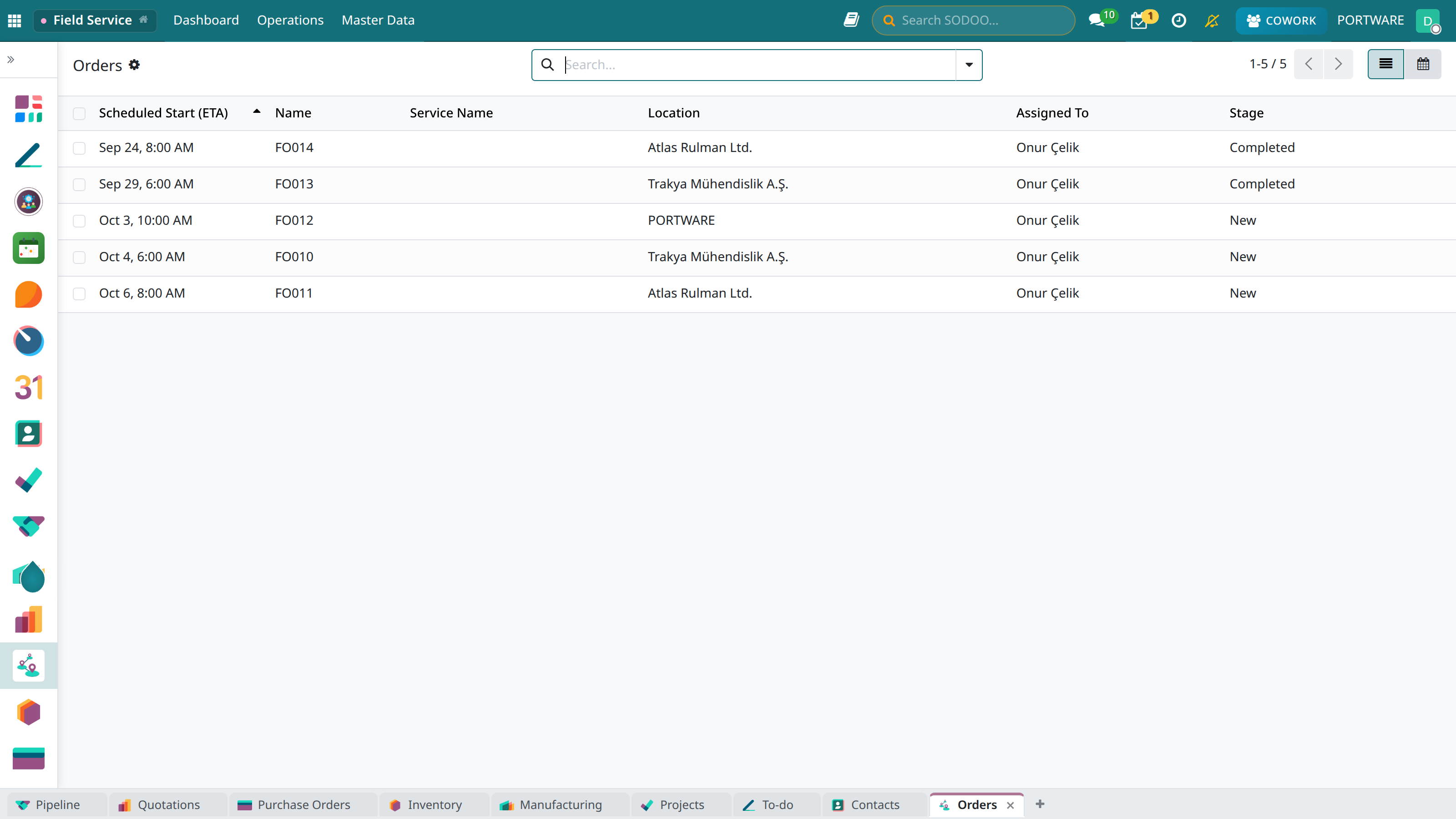
Field Service - the work orders kanban view
Map View
Real-time technician locations and customer addresses on the map.
Route Optimisation
Automatically calculating the most efficient route with a smart algorithm.
Mobile App
A mobile app that lets technicians work offline in the field.
Digital Forms
Checklists, taking signatures and adding photos.
Work Orders
A work order is the basic document defining the job to be done at the customer's location. Each work order contains the customer, address, task type and the assigned technician.
Creating a Work Order
- Click Field Service → Work Orders → New
- Choose the customer and the service address
- Set the task type (installation, repair, maintenance etc.)
- Assign a technician and date/time
- Add the required materials and checklist
- Save and notify the technician
Work Order States
| State | Description |
|---|---|
| Scheduled | Date and technician assigned, waiting to start |
| In Progress | The technician is on site, work under way |
| Done | The job is finished and the customer's approval received |
Technicians
Define your field team, set their areas of expertise and distribute their workloads evenly.
Technician Profile
- Areas of expertise: Air conditioning, electrical, mechanical etc.
- Working region: The geographic area they can serve
- Working hours: Weekly availability calendar
- Equipment: Vehicle and tool inventory
- Certificates: Professional documents with validity dates
Automatic Assignment
The system can assign work orders automatically by these criteria:
- Matching area of expertise
- Current workload
- Proximity to the customer
- Availability
Map View
Monitor all your field operations on the map in real time. Technician locations, customer addresses and work orders are tracked visually.
Field View - İstanbul
Map View
Map Features
- Live location: Technician locations by GPS
- Colour codes: Available (green), busy (red), on the way (yellow)
- Cluster view: Nearby locations are grouped
- Filtering: Filters by region, team, date
Planning
Manage work orders and technician schedules with the Gantt view or the calendar. Plan easily by drag and drop.
Planning Views
- Calendar: Monthly, weekly, daily views
- Gantt: Timeline and resource planning
- List: Detailed table view
- Kanban: State-based columns
Route Optimisation
The smart routing algorithm lets technicians follow the most efficient route during the day. It saves fuel and makes it possible to complete more jobs.
Time Saving
An average 20-30% reduction in travel time.
Fuel Savings
Shorter distance, lower fuel consumption.
More Jobs
More customer visits per day.
Dynamic Update
Recalculation for traffic and emergencies.
Mobile App
Technicians can reach all work orders from the field with the SODOO mobile app. It also works in offline mode and synchronises when the connection returns.
Mobile Features
- Job list: Viewing the day's tasks
- Navigation: Directions to the customer address
- Check-in/out: Recording arrival and departure (GPS)
- Checklist: Filling in digital forms
- Photo: Adding before/after images
- Signature: Taking the customer's approval signature
- Materials: Recording the parts used
- Time recording: Calculating working time automatically
Checklists
Create customised checklists for each task type. Technicians follow the operations step by step and keep to quality standards.
Air Conditioning Maintenance Checklist
Creating a Checklist
- Go to Configuration → Task Types
- Choose the related task type or create a new one
- Edit the checklist template
- Add the steps in order
- Mark them as required/optional
Material Management
Track the spare parts and materials used in the field. Technician vehicle inventory and central warehouse integration.
Material Tracking
- Vehicle inventory: The materials in each technician's vehicle
- Work order materials: What was used on which job
- Automatic stock deduction: Used material is deducted from stock
- Reordering: Minimum stock warnings
Time Tracking
Record working time for each work order automatically or manually. Timesheet integration makes payroll and invoicing easier.
Time Record Types
| Type | Description |
|---|---|
| Working Time | Active working time spent at the customer |
| Travel Time | Travel time to and from the customer |
| Waiting Period | Time waiting for parts or on a break |
Reports
Access various reports to analyse your field operations.
Key Reports
- Technician performance: Completion rate, customer rating
- Task analysis: Work distribution by type
- Customer satisfaction: Survey results
- Material use: The most used parts
- Time analysis: Average working and travel times