Lesson 0 · What PLM is, and why
A PLM keeps one true version of every part; SODOO PLM does it in the same database as the ERP.
Goal of this lessonTo understand the problem a PLM solves, and what changes when it lives in the same database as the ERP.
One true version of every part
Product Lifecycle Management (PLM) keeps one true version of every part: its number (engineering code), its version (revision), its drawings and CAD models, its bill of materials and every change made to it — who made it, when and why. The aim is that purchasing, production and sales always work from the released design, never from an old print on somebody's desk.
SODOO PLM is built on the open-source OdooPLM and follows the change process of enterprise systems such as Teamcenter and Windchill (the CMII closed loop). Its biggest difference is where it lives: PLM and ERP share one database. A change request sees the part's open manufacturing orders, purchase and sale lines and stock on hand at that moment; there is no second copy to transfer or reconcile.
A part on the screen: what we look at
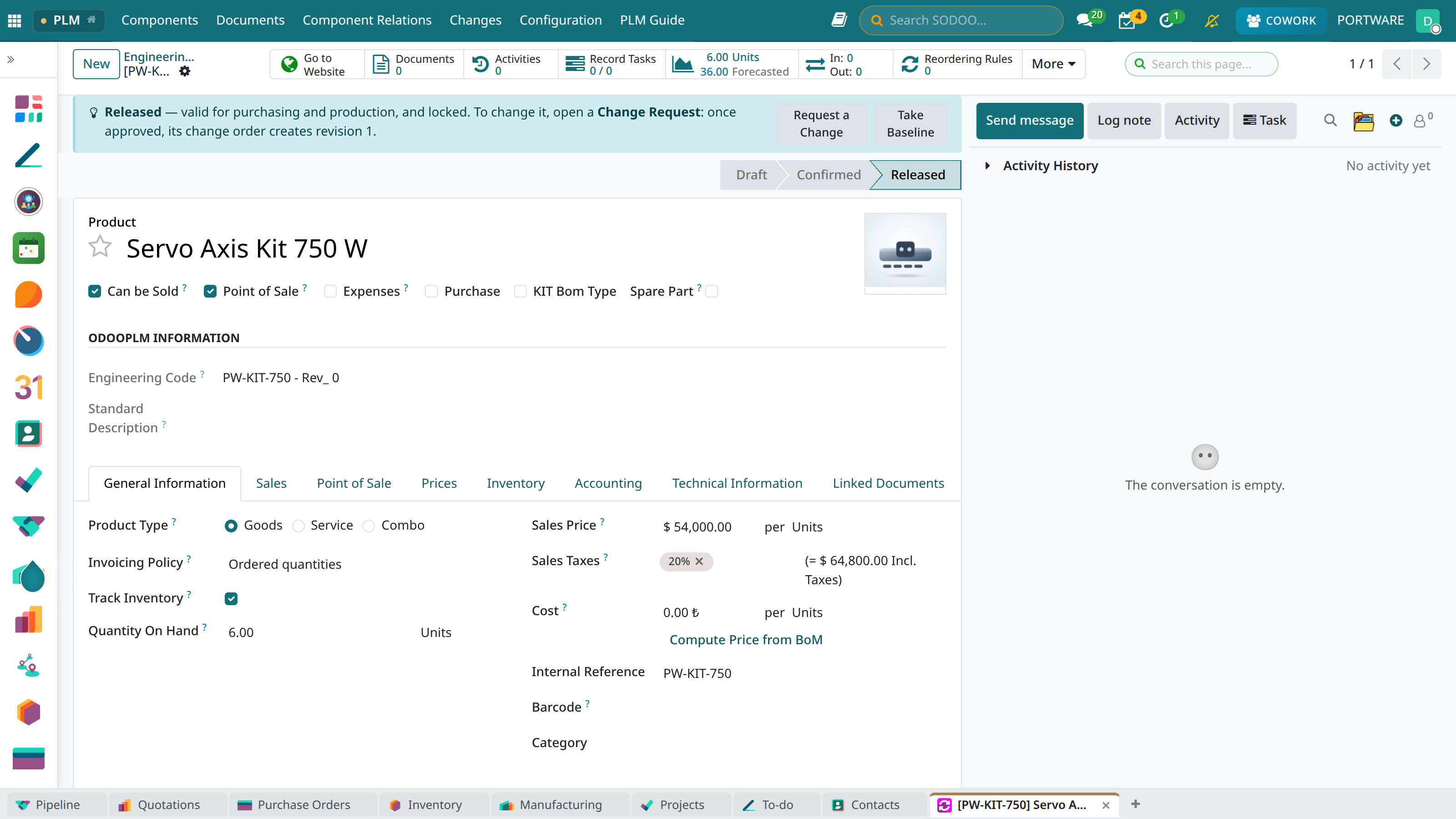 12345
12345- Status bar: the part is Released — valid for production and purchasing, locked.
- The blue guide box: says what this state means and what to do next.
- Request a Change: the only way to change a released part is a change request.
- Part number: the engineering code and the revision together name one exact design.
- Take Baseline: freezes the released structure as it is (Lesson 5).
Compared with Teamcenter and Windchill
| Capability | Siemens Teamcenter | PTC Windchill | SODOO PLM |
|---|---|---|---|
| Part and document versioning | ✓ | ✓ | ✓ code + revision |
| Life cycle and workflow | ✓ | ✓ | ✓ five states, release right |
| Bill of materials (EBOM, MBOM, spare) | ✓ | ✓ | ✓ |
| Where-used | ✓ | ✓ | ✓ |
| Change management | ECR / ECN / ECO | Problem Report → Change Request → Change Notice | ECR → ECO (CMII) |
| CAD integration | ✓ | ✓ | ✓ OdooPLM client |
| Viewing in the browser | ✓ JT | ✓ Creo View | ✓ PLM 3D + CAD Viewer |
| Link to the ERP | through a connector (e.g. SAP) | through a connector (ESI) | the same database |
| Baselines (frozen structure) and comparison | ✓ | ✓ | ✓ by hand and on every applied order |
| Effectivity: date, serial number, lot | ✓ | ✓ | ✓ warned on manufacturing orders |
| Variant configuration (150% BoM) | ✓ | ✓ | ✓ requires rules, configurator |
The table describes the state on this course's publication day (8 October 2026); SODOO PLM keeps growing, and the course describes what works in the system today.
Mini case: the old print in the workshop
- Situation
- The welder builds the bracket from the print on the bench: rev 0.
- Problem
- Rev 1 was released two weeks ago; the weld size grew.
- With PLM
- The manufacturing order uses the released revision's BoM and documents; rev 0 is marked Obsoleted and enters no new work.