Maintenance Management
The SODOO Maintenance module lets you manage the maintenance processes of production equipment, facilities and infrastructure. Aim for uninterrupted operation with preventive maintenance plans, breakdown requests and work orders…
What You Will Learn in This Section
- Managing production equipment and facilities centrally
- Creating and applying preventive maintenance plans
- Handling and resolving breakdown requests quickly
- Organising maintenance processes with work orders
- Monitoring critical KPIs such as MTBF, MTTR and OEE
- Optimising spare-parts stock according to maintenance needs
- Planning the budget by analysing maintenance costs
Overview
The SODOO Maintenance module lets you manage the maintenance processes of production equipment, facilities and infrastructure. Aim for uninterrupted operation with preventive maintenance plans, breakdown requests and work orders.
Scenario: An Emergency Breakdown on a CNC Machine
Situation: A production operator reports that the CNC-005 machine is making an abnormal noise and spindle vibration has increased. The production line is at risk.
- Create an urgent request with Maintenance → Maintenance Requests → New
- Choose "CNC-005" as the equipment and set the priority to Critical
- Enter a detailed description of the problem: "Abnormal noise, increased spindle vibration"
- The system sends an SMS and e-mail notification to the maintenance team automatically
- The maintenance technician confirms the request and creates a work order
- The spare-parts need is identified (bearing, belt) and reserved from stock
- When the repair is complete, a test is run and the equipment is handed back to production
Equipment Inventory
Detailed records, technical specifications and maintenance history of all machines and equipment.
Preventive Maintenance
Minimise breakdown risk and extend equipment life with planned maintenance.
Breakdown Management
Quick breakdown reporting, prioritisation and response tracking.
OEE Analysis
Equipment effectiveness and performance measurement, loss analysis.
Maintenance Strategies Compared
| Strategy | Description | Advantages | Disadvantages | Use |
|---|---|---|---|---|
| Reactive (Corrective) | Intervention after a breakdown | Low planning cost | Unexpected stoppages, high repair cost | Non-critical equipment with spares available |
| Preventive (PM) | Planned maintenance by time/usage | Planned stoppage, fewer urgent breakdowns | Risk of unnecessary maintenance, wasted parts | Production machines, critical equipment |
| Predictive (PdM) | Condition-based maintenance from sensor data | Optimal maintenance timing | High investment cost, requires expertise | Critical and expensive equipment |
| Reliability-Centred (RCM) | Risk-based maintenance planning | Optimal use of resources | Requires detailed analysis | Site-wide strategy |
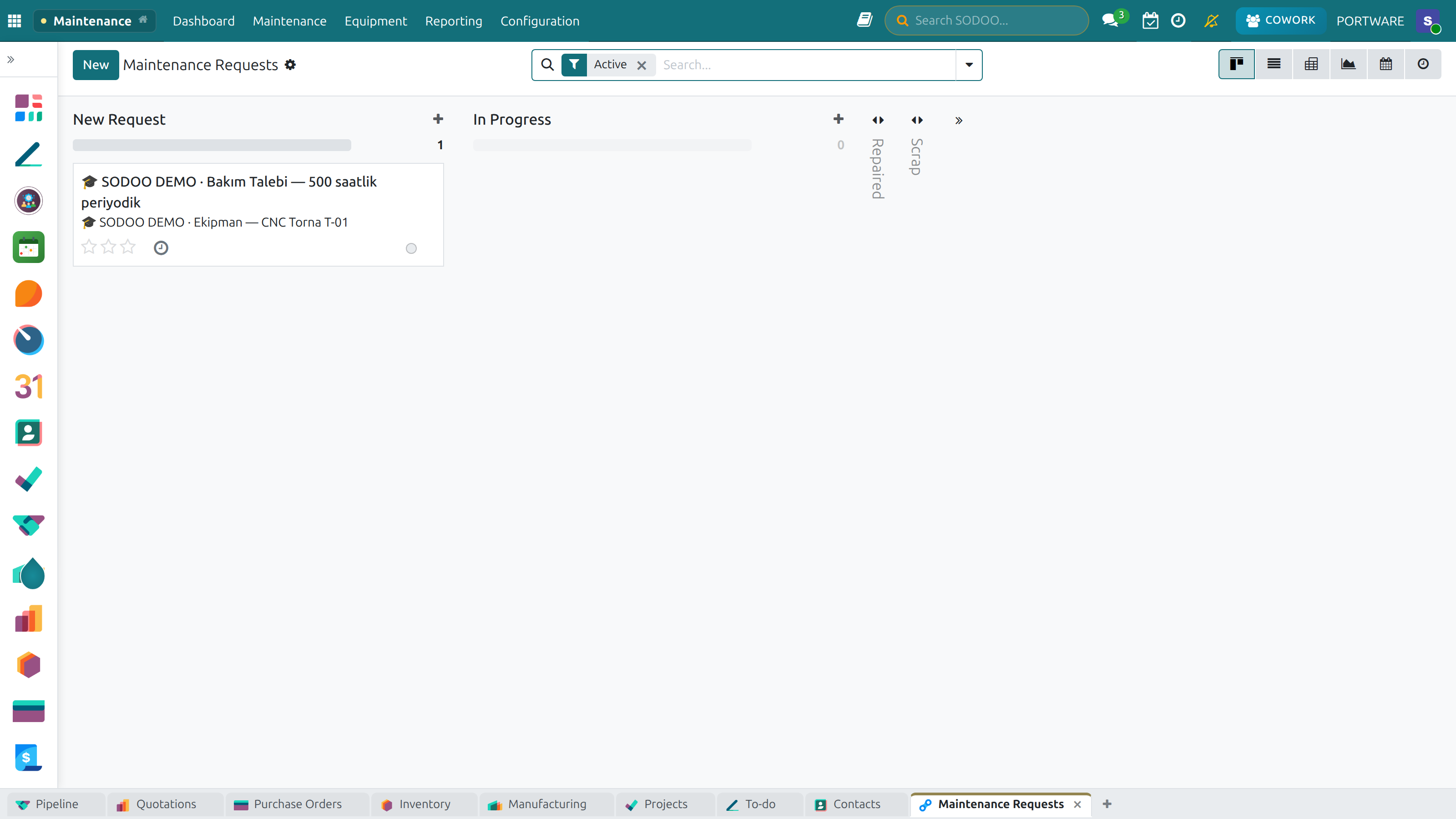
Maintenance Management - the main screen
Equipment Management
Define, classify and track all the equipment to be maintained. For each piece of equipment, detailed technical information, maintenance history and related documents are managed in one place.
Steps to Add Equipment
- Go to the Maintenance → Equipment → New menu
- Enter the equipment name and a unique code (e.g. CNC-005)
- Choose a category (CNC Machines, Presses, etc.)
- Add the serial number, manufacturer and model details
- Enter the location (Plant, Section, Coordinates)
- Define the technical specifications (power, capacity, size)
- Enter the purchase date, warranty period and cost
- Upload the technical documents (user manual, diagrams)
- Assign the responsible maintenance team
Equipment Hierarchy
Organise equipment in a hierarchical structure. This structure makes maintenance planning and reporting easier:
Site (Level 1)
Plant, warehouse, office building - the top location level
Section/Line (Level 2)
Production line, assembly section, paint shop - functional areas
Machine (Level 3)
CNC machine, press, conveyor - main equipment
Subsystem (Level 4)
Hydraulic unit, pneumatic system, electrical panel
Component (Level 5)
Motor, pump, bearing, sensor - the smallest maintenance unit
Equipment Categories and Criticality
| Category | Criticality | Maintenance Strategy | Example Equipment |
|---|---|---|---|
| CNC Machines | Critical | Preventive + Predictive | Lathes, Mills, Machining Centres |
| Presses | Critical | Preventive + Periodic Inspection | Hydraulic Press, Eccentric Press |
| Conveyors | High | Preventive Maintenance | Belt Conveyor, Chain Conveyor |
| Compressors | High | Preventive + Counter-Based | Screw Compressor, Piston |
| HVAC Systems | Normal | Seasonal Preventive | Air Conditioning, Ventilation |
| Electrical Panels | High | Thermographic Inspection | Main Panel, MCC, PLC Panels |
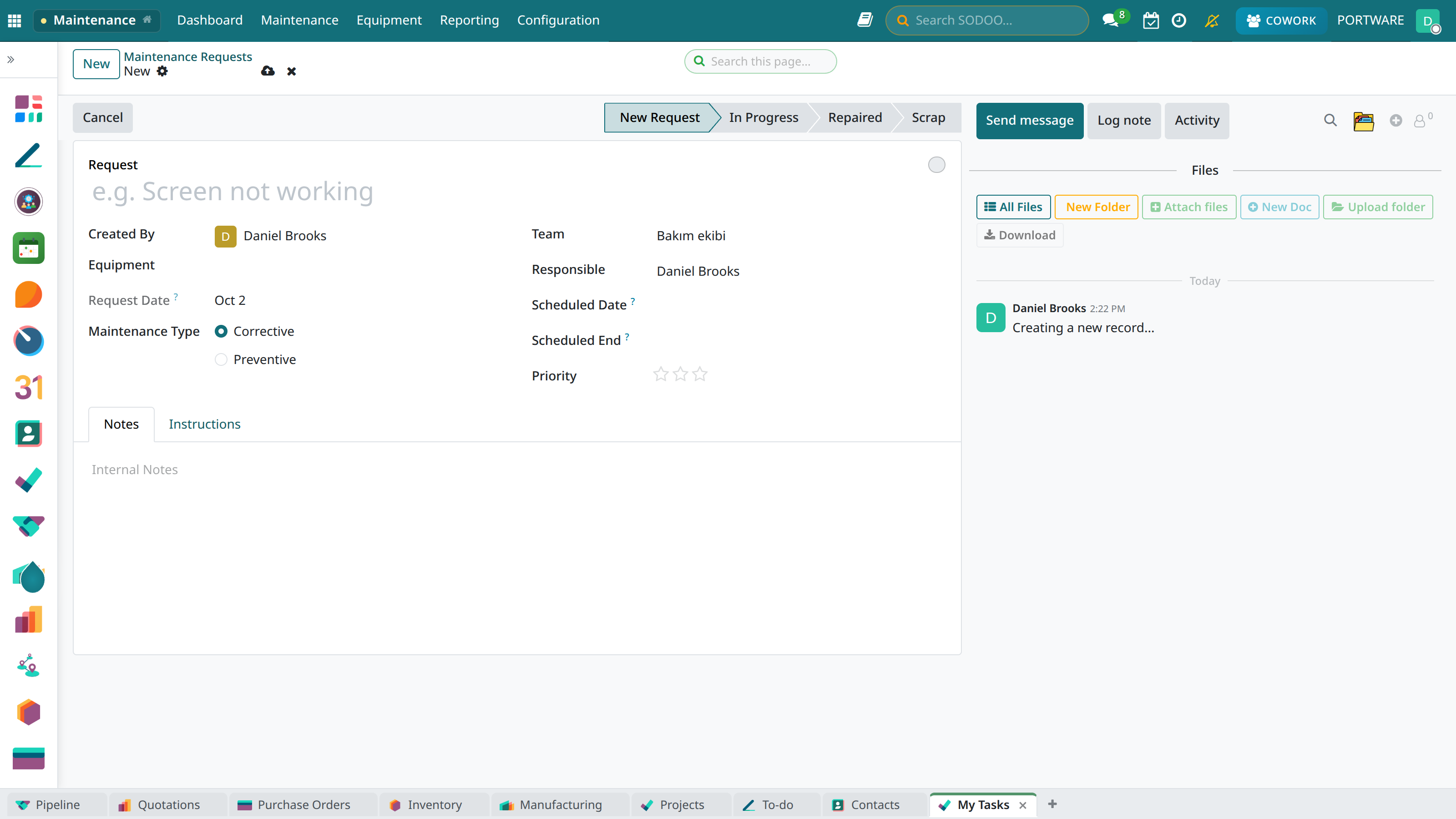
Equipment Detail Form - the screen for creating a new maintenance record
Maintenance Requests
Manage breakdown reports and maintenance requests centrally. All requests coming from the production team, operators or automatic sensor alarms are gathered in one pool.
Ways to Create a Request
Manual Report
Created directly in the system by an operator or supervisor.
Mobile App
Quick reporting in the field by scanning a QR code or with a mobile form.
Automatic Alarm
Critical values from IoT sensors create a request automatically.
E-mail Integration
E-mails sent to a set address are turned into requests.
Request Form Contents
- Equipment: Choose the machine that needs repair/maintenance
- Problem type: Breakdown, Low Performance, Preventive Maintenance Need
- Description: Describe the problem in detail (sound, smell, visual sign)
- Priority: Critical, High, Normal, Low
- Photo/Video: Add visual evidence (optional)
- Equipment state: Running, Restricted, Stopped
Priority Levels and SLA
| Priority | Definition | Response Time | Resolution Target | Notification |
|---|---|---|---|---|
| Critical | Production stopped, safety risk | 15 minutes | 4 hours | SMS + E-mail + Audible Alarm |
| High | Production affected, low performance | 30 minutes | 8 hours | SMS + E-mail |
| Normal | Planned maintenance need, small problems | 4 hours | 48 hours | |
| Low | Cosmetic, improvement suggestion | 24 hours | 1 week |
Request States and Workflow
| State | Description | Responsible |
|---|---|---|
New | Request created, awaiting evaluation | Maintenance Planner |
Evaluation | Being examined by a technician | Maintenance Technician |
Posted | Work order created, planning in progress | Maintenance Supervisor |
In Progress | Maintenance work has started | Maintenance Technician |
Testing | Repair completed, being tested | Production + Maintenance |
Done | Request closed, equipment handed back | Production Manager |
Rejected | The request was found invalid or unnecessary | Maintenance Manager |
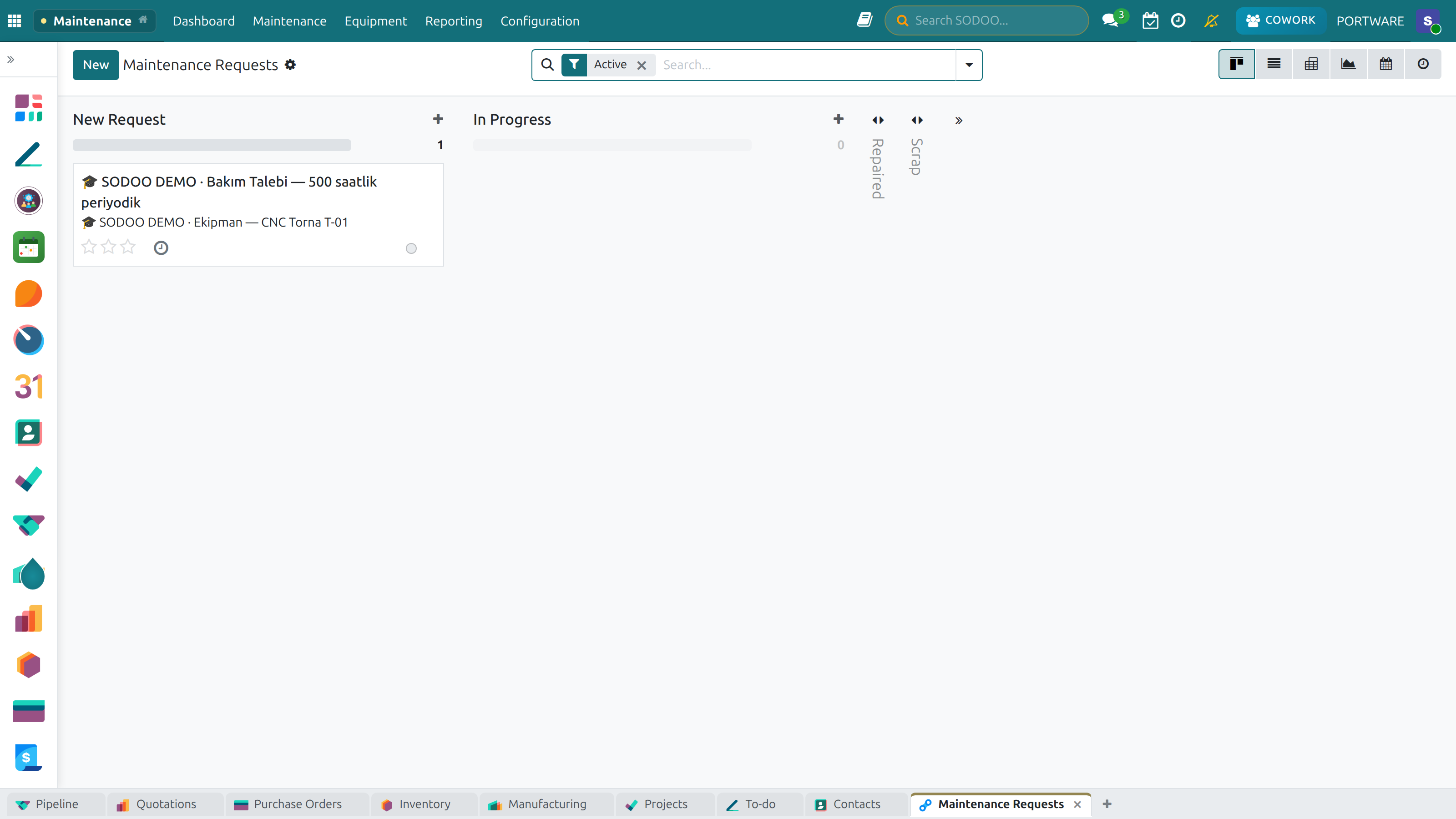
Maintenance requests as a list — equipment, owner, category and stage
Preventive Maintenance
Extend equipment life and reduce the risk of unexpected breakdowns with planned maintenance. Preventive maintenance can cut total maintenance cost by 25-30%.
Scenario: Creating a PM Plan for New Equipment
Situation: You need to create a preventive maintenance plan for a newly bought hydraulic press in line with the manufacturer's recommendations.
- Go to the Maintenance → Preventive Maintenance → New Plan menu
- Choose the new hydraulic press as the equipment
- Enter the maintenance activities from the manufacturer's manual:
- Daily: Visual check, oil level
- Weekly: Filter check, leak test
- Monthly: Oil sample analysis, pressure test
- Yearly: Full overhaul, seal replacement
- Enter the interval and estimated duration for each activity
- List the required spare parts and consumables
- Assign the responsible technician or team
- Activate the plan → the system will create work orders automatically
Interval Types
| Type | Trigger | Used For | Example |
|---|---|---|---|
| Time-Based | Fixed calendar (day/week/month) | Equipment that runs regularly | Lubrication every 30 days |
| Counter-Based | Operating hours/production quantity | Heavily used machines | Filter change every 500 hours |
| Mixed | Whichever comes first | Variable production schedule | 3 months or 1000 hours |
| Event-Based | After certain events | Special situations | Check after a mould change |
Standard Maintenance Activities
Visual Inspection
Checking for leaks, wear, loosening, deformation. 5-10 min.
Lubrication
Grease points, oil level check, oil change. 15-60 min.
Cleaning
Filter cleaning, chip removal, dusting. 10-30 min.
Adjustment/Calibration
Tension adjustment, alignment, calibration check. 30-120 min.
Part Replacement
Belt, seal, bearing, filter replacement. 30-240 min.
Test
Performance test, safety check, certification. 15-60 min.
Example Maintenance Checklist: CNC Machine
| Activity | Interval | Duration | Required Material |
|---|---|---|---|
| Chip removal, visual check | Daily | 15 min | Cleaning material |
| Oil level check | Daily | 5 min | - |
| Coolant concentration | Weekly | 10 min | Refractometer |
| Slideway lubrication | Weekly | 20 min | Slideway oil |
| Filter replacement | Monthly | 30 min | Air/oil filter |
| Spindle check | Every 3 months | 60 min | Dial indicator |
| Geometry check | Yearly | 240 min | Calibration tools |
Work Orders
Manage maintenance work with work orders. Each work order defines the job to be done, the person responsible, the required resources and the schedule.
Work Order Sources
Planned Work Orders
- Automatically from the preventive maintenance plan
- Triggered by counter/time
- Planned overhauls and inspections
- Coordinated with the production plan
Unplanned Work Orders
- Converted from a breakdown request
- Situations needing urgent intervention
- Unexpected performance drops
- A safety risk being detected
Work Order Contents
| Field | Description | Required |
|---|---|---|
| Work Order No | A unique, automatically generated number | ✓ |
| Equipment | The machine/equipment to be maintained | ✓ |
| Work Type | Breakdown, Preventive, Improvement, Overhaul | ✓ |
| Priority | Critical, High, Normal, Low | ✓ |
| Activities | A detailed list of the work to be done | ✓ |
| Technician | The responsible maintenance staff | ✓ |
| Planned Date | Start and end date/time | ✓ |
| Estimated Duration | Working time (hours) | ✓ |
| Spare Parts | Required materials and parts | - |
| Safety Notes | LOTO, personal protective equipment | - |
| Related Documents | Diagrams, procedures, manuals | - |
The Work Order Life Cycle
State Transitions
- Draft → Created, not planned yet
- Planned → Date and resources assigned
- In Progress → The technician has started work
- On Hold → Waiting for parts/resources
- Done → Work finished, awaiting approval
- Closed → Approved and closed
- Cancelled → Invalid or unnecessary
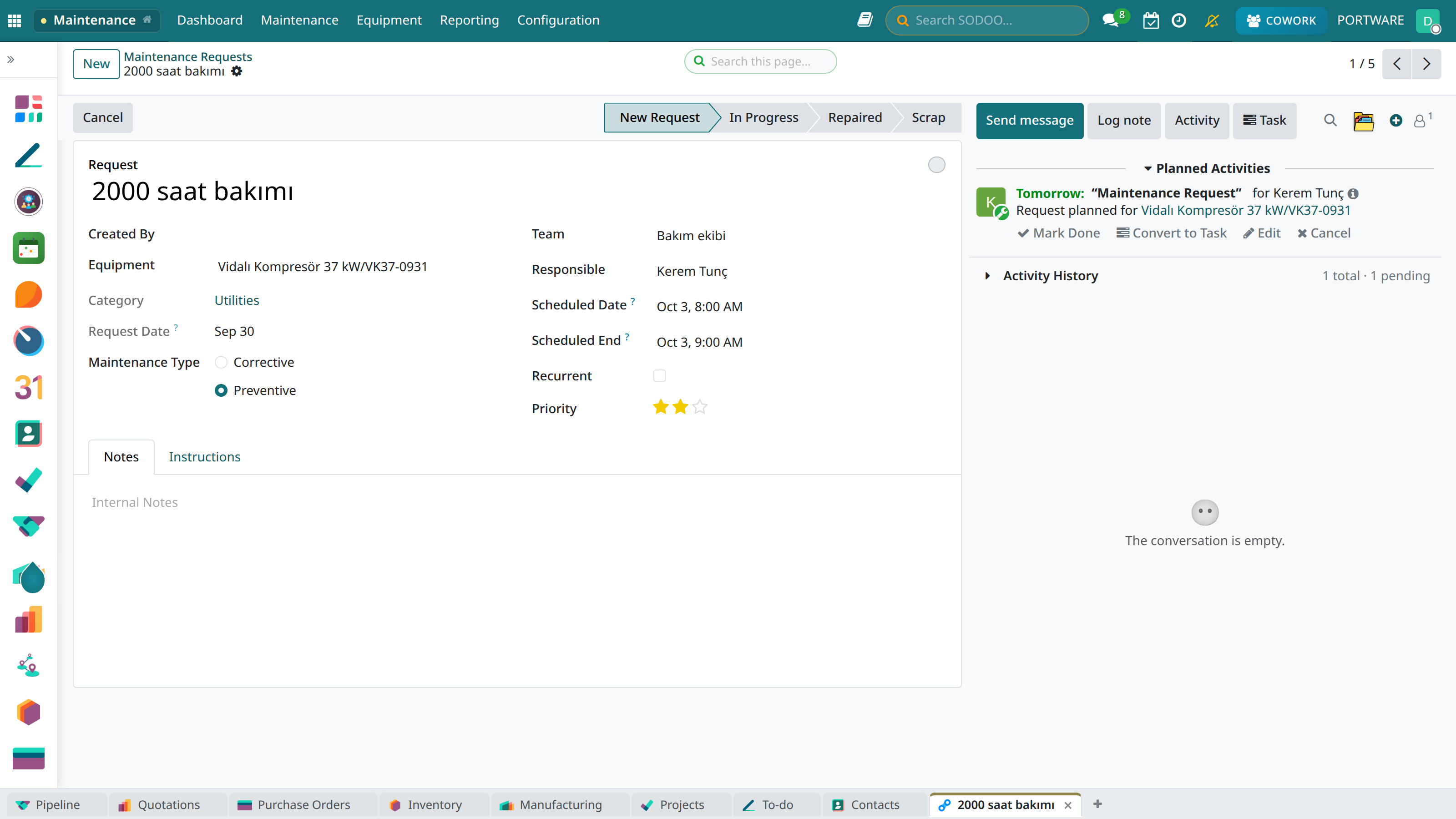
A maintenance request — equipment, preventive/corrective type, planned date and notes
Spare Parts Management
Manage the spare-parts stock needed for maintenance. Minimise maintenance interruptions with the principle of the right part, in the right quantity, at the right time.
Linking Parts to Equipment
Define the likely spare-parts needs of each piece of equipment in advance:
- Go to the equipment card and open the "Spare Parts" tab
- Link the parts used to the equipment
- Set the estimated life and criticality of each part
- Enter the minimum stock level and reorder point
- Define alternative/equivalent parts
Part Classification
| Category | Criticality | Stock Policy | Example |
|---|---|---|---|
| A - Critical | Critical | Safety stock + spare | Spindle bearing, servo motor |
| B - Important | High | Min-max stock control | Contactor, sensors |
| C - Standard | Normal | Order as needed | Filters, seals |
| D - Consumable | Low | Bulk ordering | Grease, oil, cleaning material |
Inventory Module Integration
Thanks to full integration with the Inventory module:
- Automatic reservation: Parts are reserved from stock when the work order is confirmed
- Automatic deduction: Parts used are deducted from stock when the work order is closed
- Stock warnings: Automatic notification when stock falls below the minimum
- Purchase integration: Automatic request creation at the reorder point
- Lot/serial tracking: Which part was used in which equipment is traced
Lead Time Management
Fast Supply
1-3 days: Local stockists, standard parts
Normal Supply
1-2 weeks: Distributors, special parts
Long Supply
4-12 weeks: Import, manufacturer order
Custom Manufacture
8-24 weeks: Moulds, custom-designed parts
Maintenance Calendar
Manage all planned maintenance, work orders and resource allocations on a visual calendar.
Calendar Views
| View | Use | Features |
|---|---|---|
| Daily | Hour-by-hour detailed planning | Technician capacity, time-slot view |
| Weekly | Operational planning | Workload balancing, prioritisation |
| Monthly | Strategic view | Major overhauls, production coordination |
| Gantt | Project-based work | Dependencies, critical path |
Calendar Features
- Colour coding: Colours by work order priority and state
- Red: Critical priority
- Orange: High priority
- Blue: Normal priority
- Green: Completed
- Drag & drop: Reschedule work orders by drag and drop
- Conflict check: Warning for the same equipment or technician clashing
- Filtering: Filter by equipment, technician, work type
Resource Scheduling
Distribute technician capacity evenly:
Capacity View
Each technician's daily/weekly load.
Team Assignment
Automatic suggestions by area of expertise.
Load Balancing
Even distribution of work and optimisation.
Leave Integration
Holiday/leave synchronisation with the HR module.
Predictive Maintenance (PdM)
Predict breakdowns in advance using sensor data and condition monitoring. Predictive maintenance saves 10-15% more cost than preventive maintenance.
Condition Monitoring Techniques
| Technique | Monitored Parameter | Detected Fault | Equipment Type |
|---|---|---|---|
| Vibration analysis | Frequency, amplitude, trend | Bearing, imbalance, looseness | Rotating equipment |
| Thermography | Temperature distribution | Electrical connections, overheating | Electrical panels, motors |
| Oil analysis | Particle count, chemical analysis | Wear, contamination | Gearboxes, hydraulics |
| Ultrasonic | High-frequency sounds | Leaks, electrical arcing | Pressurised systems, electrical |
| Motor current analysis | Current waveform | Rotor bars, stator faults | Electric motors |
IoT Sensor Integration
SODOO can process data coming from IoT sensors:
- Collecting and storing sensor data
- Defining thresholds and alarm rules
- Trend analysis and anomaly detection
- Creating maintenance requests automatically
- Real-time monitoring on the dashboard
Advantages of Predictive Maintenance
- Intervention before a breakdown
- Planned stoppage, minimum production loss
- Full use of part life
- Lower total maintenance cost
Disadvantages
- High initial investment
- Need for expertise and training
- Data analysis infrastructure
- Not suitable for every piece of equipment
Reports and KPIs
Measure maintenance performance and make data-driven decisions for continuous improvement.
Core Maintenance KPIs
KPI Target Values
| KPI | Definition | Target | World Class |
|---|---|---|---|
| MTBF | Mean time between failures | ≥ 500 hours | ≥ 1000 hours |
| MTTR | Mean time to repair | ≤ 4 hours | ≤ 2 hours |
| Availability | Equipment readiness rate | ≥ 90% | ≥ 95% |
| OEE | Overall equipment effectiveness | ≥ 75% | ≥ 85% |
| PM compliance | Compliance with the preventive maintenance plan | ≥ 90% | ≥ 98% |
| PM/CM ratio | Preventive/corrective maintenance | ≥ 70/30 | ≥ 80/20 |
Standard Reports
Breakdown History
Breakdown records per equipment, trend analysis.
Technician Performance
Completed work, average time, efficiency.
Maintenance Type Distribution
PM vs CM ratio, trend tracking.
Parts Consumption
The most used parts, cost analysis.
Cost Report
Maintenance cost by equipment/category.
Pareto Analysis
The most problematic equipment, the 80/20 rule.
Dashboard Metrics
The real-time maintenance dashboard shows the following:
Configuration
Customise the maintenance module to your business's needs.
Basic Settings
Accessible from the Settings → Maintenance menu:
| Setting | Description | Default |
|---|---|---|
| Work Order Numbering | Automatic number format (WO/2026/00001) | WO/YYYY/NNNNN |
| Default Priority | The initial priority for new requests | Normal |
| PM Reminder Period | Notification before preventive maintenance | 3 days |
| SLA Escalation | Escalation when the response time is exceeded | Enabled |
| Inventory Integration | Spare-parts stock check | Enabled |
| Mobile Access | The field technician mobile app | Enabled |
Defining Equipment Categories
- Maintenance → Configuration → Equipment Categories
- Add a category with "New" (CNC Machines, Presses, etc.)
- Set the default maintenance strategy for each category
- Define the criticality level
- Assign the related maintenance team
Creating Maintenance Teams
- Maintenance → Configuration → Maintenance Teams
- Enter the team name and the person responsible
- Define the areas of expertise (Mechanical, Electrical, Hydraulic)
- Assign the team members
- Set the working hours and shifts
Notification and Alert Settings
E-mail Notifications
E-mail for new requests, work order assignments and SLA warnings.
SMS Notifications
Instant SMS alerts for critical breakdowns.
System Notifications
In-app push notifications.
Calendar Reminder
Reminders for upcoming PM and work orders.
Frequently Asked Questions
How often should the preventive maintenance plan be reviewed?
Preventive maintenance plans should be reviewed:
- Periodically: Evaluate all plans at least once a year
- After a breakdown: Question the PM plan when an unexpected breakdown happens
- Equipment change: After new equipment or a modification
- Performance data: When MTBF/MTTR values move outside the target
Tip: If PM compliance falls below 90%, the plan may be unrealistic; revise it.
How are MTBF and MTTR calculated?
MTBF (Mean Time Between Failures):
MTBF = Total Operating Time / Number of Failures
Example: 1000 hours of operation, 5 failures → MTBF = 200 hours
MTTR (Mean Time To Repair):
MTTR = Total Repair Time / Number of Failures
Example: 10 hours of repair in total, 5 failures → MTTR = 2 hours
SODOO calculates these values automatically from the work order data.
How is critical spare-parts stock determined?
Consider these factors when setting critical spare-parts stock:
- Equipment criticality: The production impact of the equipment the part is used in
- Lead time: How long the part takes to obtain
- Failure frequency: Estimated consumption from past data
- Cost: Holding cost vs. production loss cost
Formula: Safety Stock = Daily Consumption × Lead Time × Safety Factor
Which equipment should predictive maintenance be applied to?
Predictive maintenance (PdM) is recommended for:
- Critical equipment: Machines whose breakdown stops production
- Expensive equipment: Assets with a high investment cost
- Rotating equipment: Suitable for vibration analysis
- Electrical systems: Ideal for thermography
- Hydraulic systems: Oil analysis can be applied
Evaluate the payback by calculating the ROI. Usually 6-18 months.
What information must be entered before a work order is closed?
When closing each work order, the following are mandatory:
- Actual time: Total working time (hours)
- Work done: A description of the completed activities
- Parts used: Replaced/consumed materials
- Root cause: The cause of the breakdown (for corrective maintenance)
- Test result: Is the equipment running normally?
This data is critical for the MTTR calculation and continuous improvement.
What should I do if OEE is below 85%?
Analyse the three components to find the source of low OEE:
- Low availability: Reduce unplanned stoppages, improve the PM plan
- Low performance: Analyse speed losses, optimise set-up times
- Low quality: Investigate the causes of defective production, improve process control
Identify and prioritise the biggest source of loss with a Pareto analysis.
How is maintenance information handed over at shift changes?
These methods can be used for shift handover:
- Shift note: Leaving a summary note at the end of each shift
- Dashboard: Viewing work orders in progress
- Activity tracking: A list of pending and overdue tasks
- Verbal handover: Face-to-face briefing for critical work
You can standardise handovers by setting up a shift note system in SODOO.
How is maintenance of equipment under warranty tracked?
To preserve the warranty conditions:
- Enter the warranty start and end dates on the equipment card
- Include the warranty conditions (OEM maintenance requirements) in the PM plan
- Document all maintenance records and parts used
- Set a reminder before the warranty period ends
- Add a warning note so that no unauthorised intervention is made
Contact the manufacturer for breakdowns covered by warranty.