







Data ownership
Your data stays in a standard database, on the server you choose, in a form you can export.
Data ownership means a company can reach and take its own records independently of the vendor. PORTWARE keeps data in a standard PostgreSQL database with an open schema, exports lists to Excel and CSV, and can be installed on your own server or on a PORTWARE server.
See it in the product
Each film walks one application's pages and shows what it gives you, in about two minutes.
The Problem
If data is locked in the vendor's format, changing software means starting over. With limited export, past records, documents and reports cannot move to a new system.
Who It Is For
Business owners choosing software, IT leads and finance managers.
Step By Step
- Choose Where It RunsInstall on your own server or on a PORTWARE server.
- Decide AccessUser and group rights define who sees what.
- Plan The BackupHow often and where backups are kept is written at installation.
- Connect AIProvider and model are chosen with the company's own key.
- Try An ExportDownload a list as Excel and check its contents.
On The Real Screen
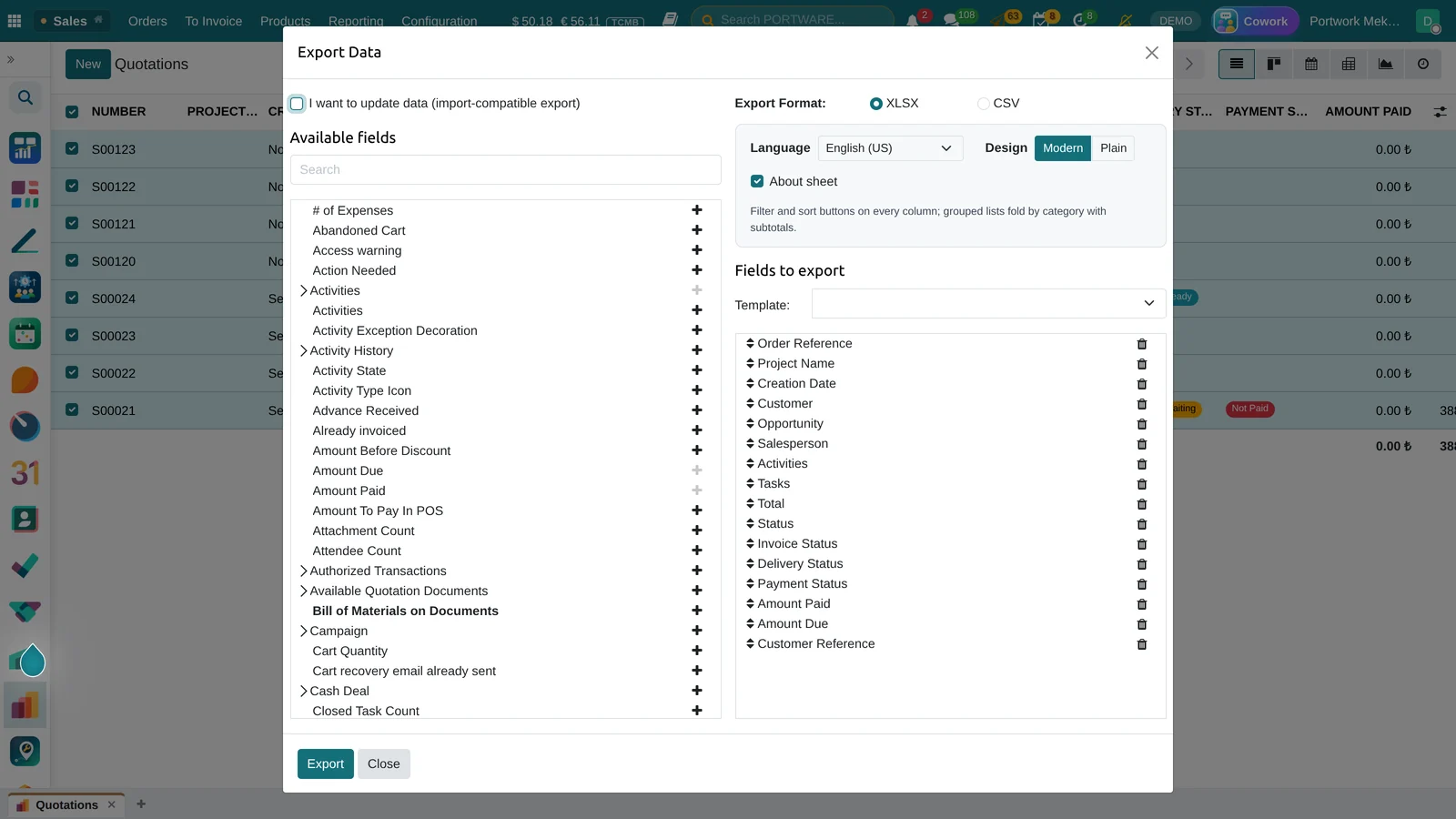
Choose the fields of a list and download XLSX or CSV.
Before You Start
- Running on your own server needs a server and an administrator; the server is not part of the licence.
- Who is responsible for backups is written down at installation.
- If AI is used, the company obtains the provider key.
- Legal retention periods are set with the company's own adviser.
When choosing business software, the real question is not what it does today but what happens to your data if you want to leave tomorrow.
In PORTWARE the database is standard and users export records themselves. For AI features the company chooses the provider and the key.
What you get with PORTWARE
- Standard PostgreSQL database, open schema
- Excel and CSV export from lists
- Installation on your own server or on a PORTWARE server
- The company chooses the AI provider and key
- The history of record changes stays on the record
PORTWARE at a glance
- Product
- PORTWARE — Productive Business Management System: fully integrated and web-based; ERP, CRM, manufacturing, PLM, quality, projects, finance, HR, documents, office and AI on one platform
- Maker
- PORTWARE
- Data
- Standard PostgreSQL — open schema, exportable data
- Access
- Browser and mobile; nothing to install on the client
- Hosting
- On your own server or on PORTWARE's
- Languages
- Turkish and English interface, documents and reports
- Compliance
- Turkish e-Invoice, e-Archive, e-Waybill and the uniform chart of accounts installed
- Office
- Word, Excel and presentation files in the browser, on the record, co-edited; versioned, differences cell by cell (PORTWARE Office)
- AI
- Cowork AI on every screen; the company picks the provider and model with its own keys
- Integration
- REST and XML-RPC API, Excel/CSV import and export
Frequently asked questions
If we leave, can we take our data?
Yes. Data is in standard PostgreSQL, and lists export to Excel and CSV.
Does our data go to an AI provider?
Only when an AI feature is used, and only to the provider the company chose.
How long does a move to PORTWARE take?
It depends on scope. Core processes such as sales, inventory and accounting usually go live first; manufacturing, projects and HR follow in stages. You can try your own processes in a demo account first.
Can we bring our existing data?
Yes. Customers, suppliers, products, stock and open balances are imported from Excel/CSV templates; historical documents get their own migration plan.
Does it fit Turkish regulations?
e-Invoice, e-Archive, e-Waybill, tax-authority integration, tax offices and the uniform chart of accounts are installed, with a Turkish interface and documents.
Can it be tailored to our company?
Yes. Fields, screens, approval flows, reports and documents are adapted to your company, and modules are written for you when needed.
What is PORTWARE's licence model — is there a per-user fee?
The modules PORTWARE writes are licensed LGPL-3; no per-user licence fee is required. The cost is in setup, tailoring, training and support services, quoted to your scope.
Where is our data kept, and whose server is it on?
The database runs wherever you want it: on your own server or on one PORTWARE manages. The schema is open and the whole dataset can be exported at any time. Backups are taken daily and kept on a separate server.
Does it integrate with the other programs we use?
Yes. PORTWARE exposes REST and XML-RPC APIs and talks to banks, e-invoice providers, e-commerce and shop-floor systems through them. For bulk data, Excel/CSV import and export is available on every screen.
How are training and support provided?
The system ships its own handbook, application guides and per-screen help. On top of that PORTWARE trains the team during go-live and provides upgrades and support afterwards.
Related pages
You may also be looking for
Let's discuss your business.
Tell us how your organisation works today, and we will present PORTWARE through your own processes.