

SODRAW and exTable
draw.io built into every document: a drawing is kept inside the text with its editable draw.io file and a high-resolution picture, changes again years later and becomes a company asset. Excel-like tables beside it.
- The diagram stays editableInstead of pasting a screenshot, the draw.io drawing is stored inside the field.
- Excel habits in textMulti-cell selection and table editing in the rich-text field.
- The same tool in every fieldThe same command in a quotation note, a task description and a document.
Where it appears: The / command list in any rich-text field
SODRAW — diagrams
When you type /sodraw in a text field, the draw.io editor opens. Flowcharts, architecture drawings, installation plans, organisation charts — all of them live inside the document and can be edited again.
A drawing is kept in two parts: the high-resolution picture draw.io draws (as a file) and the editable draw.io file (carried by the picture, as part of the text). So it is not just a viewable picture: a click opens a diagram that can be edited again. The picture is drawn at ten times the resolution, so it prints sharp in a PDF too.
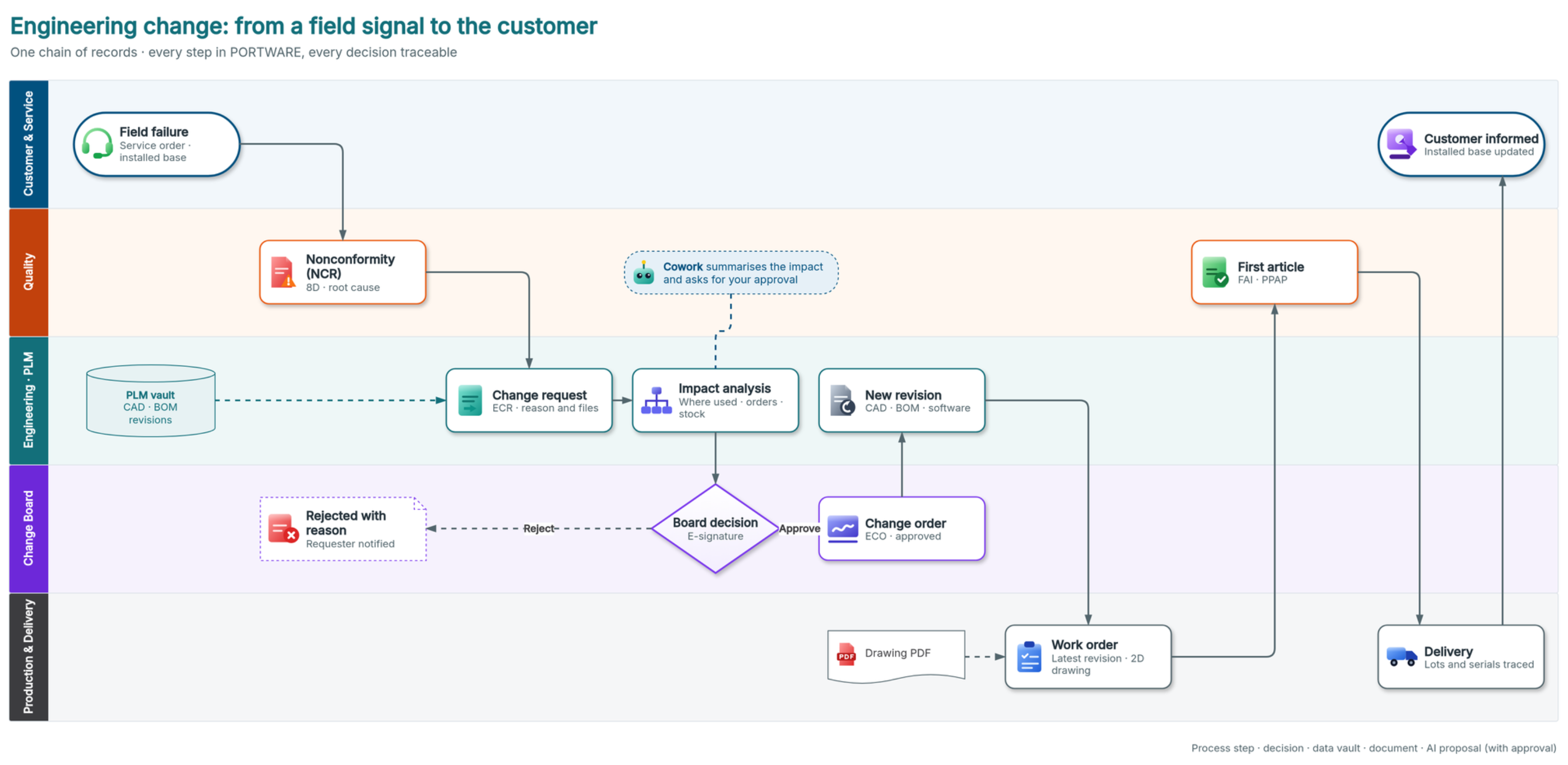
The diagram above is a real SODRAW drawing in an HTML document of the demo company: the journey of a change through the customer and service, quality, engineering, change board and production lanes, with the decision, the PLM vault, the drawing and the impact summary Cowork puts up for approval. Every box is a step PORTWARE has.
exTable — tables
Tables inside rich text are edited much like Excel: multi-cell selection, inserting and deleting rows/columns, merging cells, copying format by dragging. For a small price table, a comparison matrix or a delivery plan there is no need to open a separate file.
Since the table sits in the field's own HTML, the field's version history covers it too: when an old revision is opened, the table appears as it was on that day.
Where it helps
| Place | Use |
|---|---|
| Product internal note | Wiring diagram, terminal layout |
| Project description | Workflow, responsibility chart |
| SOTION page | Procedure flow, system architecture |
| Quotation terms | Delivery plan table |
| HTML document | A technical drawing in a brochure |
| Module | What it does | Version |
|---|---|---|
| SODRAW HTML Editor | Draw.io diagrams in HTML editor via / commands | 19.0.1.3.1 live 19.0.1.2.0 |
| exTable HTML Editor | Excel-like spreadsheet tables for HTML Editor | 19.0.1.4.1 live 19.0.1.4.0 |